Release the setup first
Confirm the released program, tool setup, material and first-part acceptance under your production procedure. Automatic mode is a sequencing mode; it does not mean the press brake handles parts unattended or makes the work area safe.
Identify the active job and bend before considering the setup released.
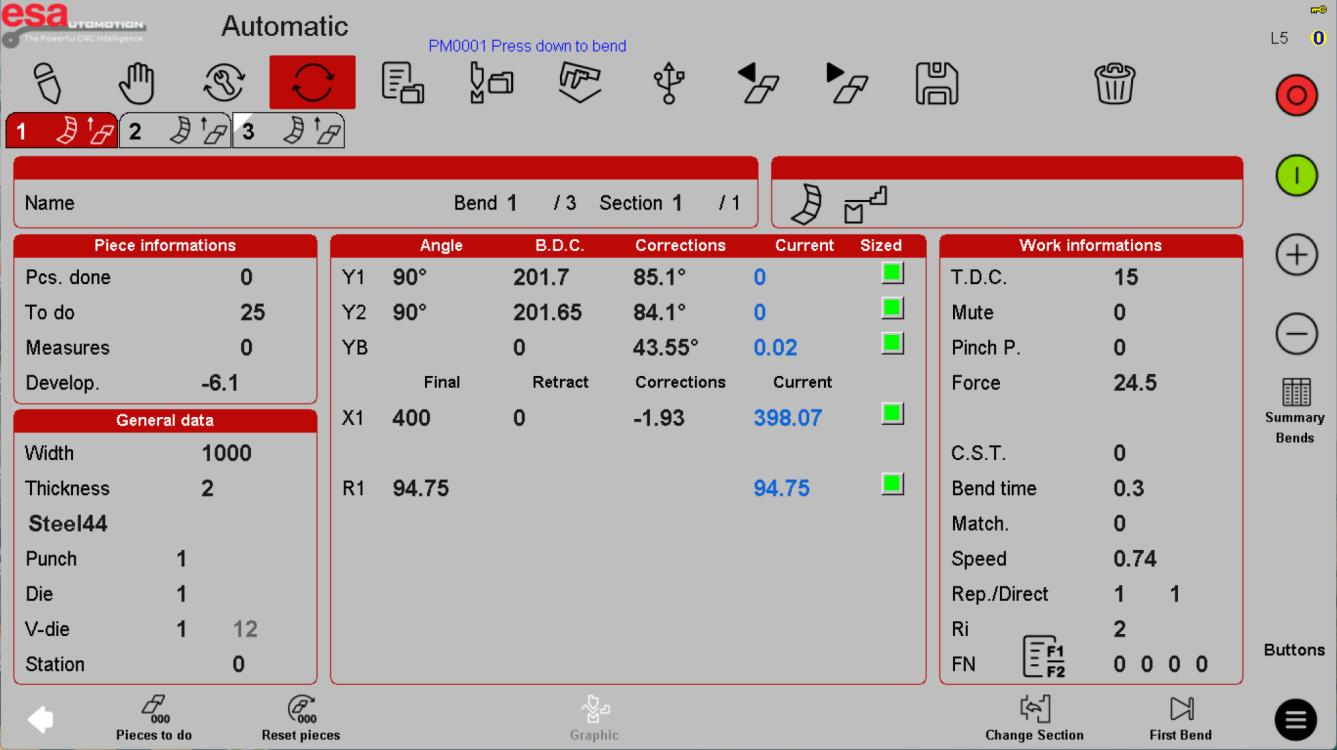
Monitor the right information
Check the active job, current bend and production quantity. Distinguish the target count from completed parts and avoid resetting counters without preserving traceability. Use the approved inspection plan rather than assuming a universal sampling interval.
In the same reference screen, focus on the production count and current bend information.
Treat interruption as a new check
After a stop, identify the active step and physical part state before continuing. An alarm or unexpected movement requires investigation under the machine procedure. Do not increase speed, alter safety-related settings or recalibrate axes simply to resume production.
The same reference shows the job state to review after an interruption; it does not prescribe a restart sequence.
Before using this on your machine
- Confirm S840 versus S840 W and the installed software revision.
- Check that the documented functions match your licenses and fitted axes.
- Protect released program and tool-library versions before changes.
- Use qualified support for motion, reference, force and safety-related settings.
S840 W specifications and option notes →
Discuss your control requirements →BENDRYX educational commentary with permission-based S840 reference screenshots. This lesson is not a machine certification, a commissioning instruction or a replacement for the supplied operating manual.